Introduction
In my previous posts, I explored BGP route filtering using Access Control Lists and Prefix Lists. Both methods filter routes based on network prefixes and subnet masks. But what if you need to filter routes based on where they originated or which autonomous systems they’ve traversed?
Enter AS-Path filtering – a powerful BGP route manipulation technique that allows you to make routing decisions based on the autonomous system path. Combined with regular expressions, AS-Path filters provide surgical precision in controlling route propagation across complex multi-AS topologies.
In this post, I’ll demonstrate three practical scenarios using AS-Path access lists with regular expressions to achieve sophisticated routing policies that would be impossible with prefix-based filtering alone.
Understanding AS-Path Filtering
What is AS-Path?
The AS-Path is a fundamental BGP path attribute that lists all the autonomous systems a route advertisement has traversed. It serves two critical purposes:
- Loop prevention: BGP routers reject routes containing their own AS number in the path
- Path selection: Shorter AS paths are preferred over longer ones (all else being equal)
When you view BGP routes, the AS-Path is displayed in the “Path” column:
R-5#sh ip bgp
     Network          Next Hop            Metric LocPrf Weight Path
 *>   1.0.0.0          192.1.35.3                             0 200 100 i
 *>   2.0.0.0          192.1.35.3                             0 200 i
 *>   6.0.0.0          192.1.35.3                             0 200 600 i
Reading from right to left:
200 100means the route traversed AS 200, then originated from AS 100200means the route originated in AS 200200 600means the route traversed AS 200, then originated from AS 600
Why Use AS-Path Filtering?
AS-Path filters excel at scenarios where prefix-based filtering falls short:
- Block routes from specific autonomous systems (competitors, untrusted peers)
- Prevent your AS from being a transit AS between other networks
- Accept only directly connected AS routes (no transit traffic)
- Filter based on AS-Path length (prefer shorter paths)
- Implement complex routing policies based on route origin and path
Regular Expressions: The Search Engine for AS-Paths
AS-Path filtering uses regular expressions (regex) – a powerful pattern-matching language. While regex can be complex, BGP filtering uses a small, manageable subset of regex syntax.
Essential Regex Special Characters
| Character | Meaning | Example | Matches |
|---|---|---|---|
^ |
Beginning of line | ^100 |
Path starting with AS 100 |
$ |
End of line | 100$ |
Path ending with AS 100 (originated from AS 100) |
_ |
Delimiter (space, start, end, comma) | _100_ |
AS 100 anywhere in path |
. |
Any single character | 10. |
AS 100, 101, 102, etc. |
* |
Zero or more of previous | .* |
Any AS path (wildcard) |
? |
Zero or one of previous | 100? |
AS 10 or AS 100 |
+ |
One or more of previous | 100+ |
AS 100, AS 1000, AS 10000 |
() |
Grouping | `(100 | 200)` |
[] |
Character set | [0-9] |
Any digit |
The Underscore: BGP’s Secret Weapon
The underscore _ is critical for BGP regex. It matches:
- Space (between AS numbers)
- Beginning of line (same as
^) - End of line (same as
$) - Comma (in AS-SET)
- Opening brace
{(in AS-SET) - Closing brace
}(in AS-SET)
This means:
_100_matches AS 100 anywhere in the path_100$matches routes originating from AS 100^100_matches routes where AS 100 is first in the path
Common AS-Path Regex Patterns
^$              Empty AS-Path (local routes only)
^100$           Only routes originating from AS 100
_100$           Routes originating from AS 100 (anywhere in path)
^100_           Routes that first traversed AS 100
_100_           AS 100 anywhere in the path
^100$|^200$     Routes from AS 100 OR AS 200
.*              Any path (permit all)
^[0-9]+$        Routes from any single AS (no transit)
Lab Topology
The topology remains consistent with my previous BGP filtering posts:
- AS 100: R-1 (edge router peering with AS 200)
- AS 200: R-2, R-3, R-4 (iBGP full mesh)
- AS 500: R-5 (peering with R-3 in AS 200)
- AS 600: R-6 (peering with R-4 in AS 200)
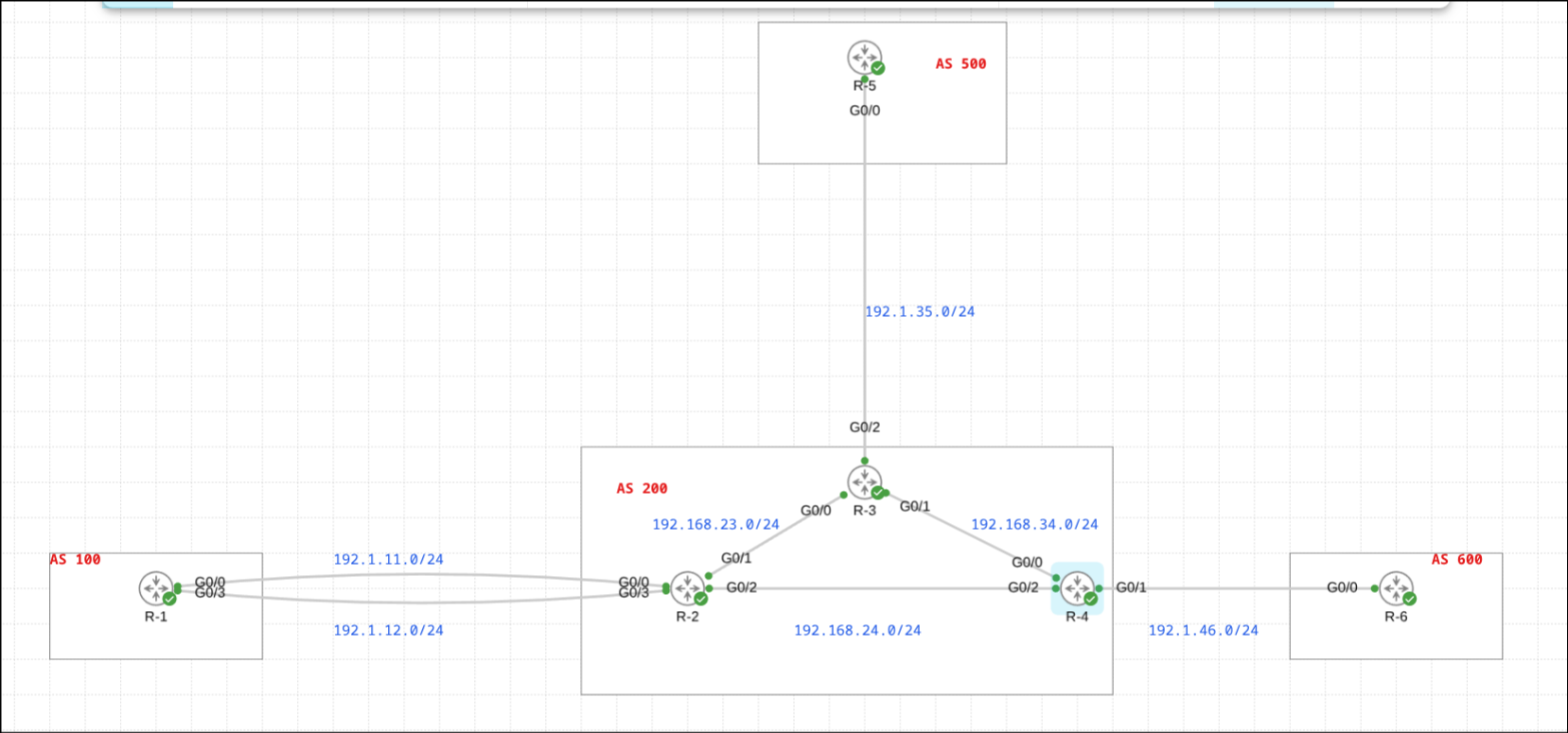
AS 200 acts as a transit network between the other autonomous systems, making it perfect for demonstrating AS-Path filtering scenarios.
Case 1: Blocking Routes from Specific Origin AS
Scenario
R-5 in AS 500 is receiving routes from R-3 (AS 200), including routes that originated in AS 100:
- 1.0.0.0/8 (path: 200 100)
- 111.0.0.0/8 (path: 200 100)
The requirement is to block all routes that originated from AS 100, regardless of which intermediate ASes they traversed.
Understanding the Requirement
We need to match routes where AS 100 appears at the end of the AS-Path, because BGP paths are read right-to-left, with the rightmost AS being the origin.
Routes to block:
200 100← AS 100 is the origin200 300 100← AS 100 is the origin (if this path existed)
Routes to allow:
200← Originated in AS 200200 600← Originated in AS 600100 200← Originated in AS 200, transited through AS 100
Configuration
On R-5, create an AS-Path access list and apply it inbound from R-3:
ip as-path access-list 1 deny _100$
ip as-path access-list 1 permit .*

router bgp 500
 neighbor 192.1.35.3 filter-list 1 in
Breaking down the regex:
_100$
_= delimiter (matches space before AS number, or beginning of line)100= literal AS number 100$= end of line (origin AS position)
This matches:
200 100✓ (AS 100 at end)300 200 100✓ (AS 100 at end)
This does NOT match:
100 200✗ (AS 100 not at end)200✗ (no AS 100)1000✗ (different AS number)
The permit statement:
.*
.= any character*= zero or more times- Result: matches any AS-Path (the “permit all” statement)
Results
Before applying the AS-Path filter, R-5 received all routes including those from AS 100:
R-5#sh ip bgp
     Network          Next Hop            Metric LocPrf Weight Path
 *>   1.0.0.0          192.1.35.3                             0 200 100 i
 *>   2.0.0.0          192.1.35.3                             0 200 i
 *>   3.0.0.0          192.1.35.3               0             0 200 i
 *>   4.0.0.0          192.1.35.3                             0 200 i
 *>   5.0.0.0          0.0.0.0                  0         32768 i
 *>   6.0.0.0          192.1.35.3                             0 200 600 i
 *>   111.0.0.0        192.1.35.3                             0 200 100 i
 *>   150.1.70.0/24    192.1.35.3                             0 200 600 i
Notice the routes with path 200 100 (1.0.0.0 and 111.0.0.0) – these originated from AS 100.
After applying the filter and performing a soft reset:
R-5#sh ip bgp
     Network          Next Hop            Metric LocPrf Weight Path
 *>   2.0.0.0          192.1.35.3                             0 200 i
 *>   3.0.0.0          192.1.35.3               0             0 200 i
 *>   4.0.0.0          192.1.35.3                             0 200 i
 *>   5.0.0.0          0.0.0.0                  0         32768 i
 *>   6.0.0.0          192.1.35.3                             0 200 600 i
 *>   150.1.70.0/24    192.1.35.3                             0 200 600 i
Perfect! The routes originating from AS 100 (1.0.0.0 and 111.0.0.0) were filtered out, while routes from AS 200 and AS 600 passed through.
Key Takeaway
The _100$ regex provides surgical precision: it blocks routes based on their origin AS, regardless of the path they took to reach you. This is impossible to achieve with prefix lists or ACLs, since those tools filter based on IP addresses, not routing path.
Case 2: Preventing Transit AS Behavior
Scenario
AS 200 (containing R-2, R-3, R-4) is currently acting as a transit AS, passing routes between AS 100 (R-1) and AS 500 (R-5), and between AS 600 (R-6) and AS 500 (R-5).
The requirement is to configure R-3 so that AS 200 does not act as a transit AS. R-5 should only receive routes that originated within AS 200, not routes from other autonomous systems that are merely transiting through AS 200.
Understanding Transit AS Behavior
Currently, R-5 can reach networks in AS 100 and AS 600 by transiting through AS 200:
- Path to AS 100:
500 → 200 → 100 - Path to AS 600:
500 → 200 → 600
AS 200 is providing transit service. To stop this, we need to advertise only routes where AS 200 is the origin – routes with an AS-Path of just 200, or in regex terms, an empty AS-Path from AS 200’s perspective (since iBGP doesn’t add AS numbers).
The Empty AS-Path Regex
When AS 200 originates a route and advertises it via eBGP, the AS-Path becomes 200. But within AS 200 (iBGP), that same route has an empty AS-Path ^$.
The regex ^$ means:
^= beginning of line$= end of line immediately after- Result: nothing between start and end = empty AS-Path
This matches only locally originated routes within the AS.
Configuration
On R-3, configure an AS-Path access list to permit only empty AS-Paths (local routes) and apply it outbound to R-5:
ip as-path access-list 1 permit ^$

router bgp 200
 neighbor 192.1.35.5 filter-list 1 out
This configuration allows R-3 to advertise only routes that originated within AS 200.
Results
Before applying the filter, R-5 received routes from AS 100, AS 200, and AS 600:
R-5#sh ip bgp
     Network          Next Hop            Metric LocPrf Weight Path
 *>   1.0.0.0          192.1.35.3                             0 200 100 i
 *>   2.0.0.0          192.1.35.3                             0 200 i
 *>   3.0.0.0          192.1.35.3               0             0 200 i
 *>   4.0.0.0          192.1.35.3                             0 200 i
 *>   5.0.0.0          0.0.0.0                  0         32768 i
 *>   6.0.0.0          192.1.35.3                             0 200 600 i
 *>   111.0.0.0        192.1.35.3                             0 200 100 i
 *>   150.1.70.0/24    192.1.35.3                             0 200 600 i
Note the paths:
200(local AS 200 routes) ← Should be advertised200 100(AS 100 routes via AS 200) ← Should be blocked200 600(AS 600 routes via AS 200) ← Should be blocked
After applying the filter:
R-5#sh ip bgp
     Network          Next Hop            Metric LocPrf Weight Path
 *>   2.0.0.0          192.1.35.3                             0 200 i
 *>   3.0.0.0          192.1.35.3               0             0 200 i
 *>   4.0.0.0          192.1.35.3                             0 200 i
 *>   5.0.0.0          0.0.0.0                  0         32768 i
Excellent! R-5 now only receives routes that originated within AS 200 (2.0.0.0, 3.0.0.0, 4.0.0.0). All transit routes (from AS 100 and AS 600) were filtered out.
Key Takeaway
The ^$ regex (empty AS-Path) is the key to preventing transit AS behavior. By advertising only locally originated routes, you ensure your AS isn’t providing free transit service to other networks. This is a common requirement in enterprise networks and ISP peering relationships.
Case 3: Accepting Routes Only from Specific Originating AS
Scenario
R-6 in AS 600 is receiving routes from R-4 (AS 200), including:
- Routes originated in AS 200 (path:
200) - Routes originated in AS 100 that transited AS 200 (path:
200 100) - Routes originated in AS 500 that transited AS 200 (path:
200 500)
The requirement is to configure R-6 to accept only routes that originated in AS 200, blocking all routes from other autonomous systems.
Understanding the Requirement
This is similar to Case 1, but inverted. Instead of blocking a specific origin AS, we’re blocking everything EXCEPT a specific origin AS.
From R-6’s perspective, routes from AS 200 have AS-Path: 200
We want to match ONLY routes where:
- The path starts with AS 200 (
^200) - AND immediately ends (
$) - No other AS numbers before or after
Configuration
On R-6, create an AS-Path access list that permits only AS 200 as origin and apply it inbound:
ip as-path access-list 1 permit ^200$

router bgp 600
 neighbor 192.1.46.4 filter-list 1 in
Breaking down the regex:
^200$
^= beginning of line (or beginning of AS-Path)200= literal AS number 200$= end of line (or end of AS-Path)
This matches:
200✓ (exactly AS 200, nothing else)
This does NOT match:
200 100✗ (AS 100 after 200)200 500✗ (AS 500 after 200)100 200✗ (AS 100 before 200)300✗ (different AS)
Important: There’s an implicit deny .* at the end of AS-Path access lists (like all Cisco access lists), so we don’t need to explicitly deny other routes.
Results
Before applying the filter, R-6 received routes from multiple autonomous systems:
R-6#sh ip bgp
     Network          Next Hop            Metric LocPrf Weight Path
 *>   1.0.0.0          192.1.46.4                             0 200 100 i
 *>   2.0.0.0          192.1.46.4                             0 200 i
 *>   3.0.0.0          192.1.46.4                             0 200 i
 *>   4.0.0.0          192.1.46.4               0             0 200 i
 *>   5.0.0.0          192.1.46.4                             0 200 500 i
 *>   6.0.0.0          0.0.0.0                  0         32768 i
 *>   111.0.0.0        192.1.46.4                             0 200 100 i
 *>   175.1.1.0/24     192.1.46.4                             0 200 500 i
 *>   205.1.1.0        192.1.46.4                             0 200 500 i
Note the variety of AS-Paths:
200(AS 200 routes) ← Should be accepted200 100(AS 100 routes) ← Should be blocked200 500(AS 500 routes) ← Should be blocked
After applying the filter and performing a soft reset:
R-6#sh ip bgp
     Network          Next Hop            Metric LocPrf Weight Path
 *>   2.0.0.0          192.1.46.4                             0 200 i
 *>   3.0.0.0          192.1.46.4                             0 200 i
 *>   4.0.0.0          192.1.46.4               0             0 200 i
 *>   6.0.0.0          0.0.0.0                  0         32768 i
Perfect! R-6 now only accepts routes that originated in AS 200 (2.0.0.0, 3.0.0.0, 4.0.0.0). All routes from AS 100 and AS 500 were blocked.
Key Takeaway
The ^200$ regex creates a whitelist approach: “only accept routes from AS 200”. This is useful when you want to ensure you’re only receiving routes from your direct upstream provider, blocking any routes they might be transiting from other peers.
AS-Path Filtering vs Other BGP Filters: A Comparison
Let’s understand when to use each filtering method:
Prefix Lists
- Purpose: Filter based on IP prefix and subnet mask
- Use when: Filtering specific networks or CIDR ranges
- Example: “Block all /32 host routes”
- Cannot do: Filter based on origin AS or path
Access Lists (ACLs)
- Purpose: Filter based on IP address and wildcard mask
- Use when: Simple IP-based filtering
- Example: “Block 10.0.0.0/8 network”
- Cannot do: Filter based on subnet mask length or AS-Path
AS-Path Filters
- Purpose: Filter based on AS-Path attributes
- Use when: Filtering based on origin AS or transit path
- Example: “Block routes from AS 100” or “Don’t be a transit AS”
- Cannot do: Filter based on specific IP prefixes
Combined Approach
Often, the most effective routing policy uses multiple filter types:
! Block specific prefixes with prefix list
ip prefix-list BLOCK-PRIVATE deny 10.0.0.0/8 le 32
ip prefix-list BLOCK-PRIVATE permit 0.0.0.0/0 le 32

! Block routes from competitor AS
ip as-path access-list 1 deny _64500$
ip as-path access-list 1 permit .*

! Combine in route-map
route-map INBOUND-POLICY permit 10
 match ip address prefix-list BLOCK-PRIVATE
 match as-path 1

router bgp 200
 neighbor 10.1.1.1 route-map INBOUND-POLICY in
Advanced AS-Path Regex Patterns
Matching Multiple AS Numbers (OR Logic)
ip as-path access-list 1 deny _100$|_200$
Blocks routes originating from AS 100 OR AS 200.
Matching AS-Path Length
ip as-path access-list 1 permit ^[0-9]+$
Permits routes with exactly one AS in the path (direct peer only).
ip as-path access-list 1 permit ^[0-9]+_[0-9]+$
Permits routes with exactly two AS numbers (one hop away).
Blocking Private AS Numbers (64512-65535)
ip as-path access-list 1 deny _64[5-9][0-9][0-9]_
ip as-path access-list 1 deny _65[0-4][0-9][0-9]_
ip as-path access-list 1 deny _655[0-2][0-9]_
ip as-path access-list 1 deny _6553[0-5]_
ip as-path access-list 1 permit .*
Matching AS Prepending
ip as-path access-list 1 permit _100_100_100_
Matches routes where AS 100 appears three times consecutively (AS prepending for path manipulation).
Troubleshooting AS-Path Filters
Verify AS-Path Access List
show ip as-path-access-list [number|name]
Example:
R-5#show ip as-path-access-list 1
AS path access list 1
    deny _100$
    permit .*
Test Regex Against AS-Path
Unfortunately, Cisco doesn’t provide a built-in tool to test regex against AS-Paths. The best approach is:
- Check current BGP table:
show ip bgp - Note AS-Paths you want to match
- Apply filter
- Do soft reset:
clear ip bgp * soft - Verify results:
show ip bgp
Debug BGP Updates (Use Carefully!)
debug ip bgp updates
This shows BGP updates being sent and received, including which filters are blocking routes. Warning: This can generate significant output in production networks.
Common Issues and Solutions
Issue: Filter not working
- Check: Is the filter-list applied in the correct direction (in/out)?
- Check: Did you perform a soft reset after applying?
- Check: Is the regex syntax correct?
Issue: Filtering too many routes
- Solution: Review your regex – did you forget the
$to anchor to end of path? - Example:
_100matches AS 100, 1000, 1001, etc. Use_100_or_100$instead
Issue: Not filtering enough routes
- Solution: Check if routes have AS-SETs or AS-CONFEDs that might change matching
- Solution: Use
show ip bgp regexp <pattern>to test what your regex matches
Best Practices for AS-Path Filtering
1. Always Include a Permit Statement
Unlike prefix lists which have explicit permit statements, it’s easy to forget that AS-Path access lists have an implicit deny all at the end:
! Without permit statement, this blocks ALL routes
ip as-path access-list 1 deny _100$
! This is needed:
ip as-path access-list 1 permit .*
2. Use Anchors Carefully
Understand the difference:
_100_= AS 100 anywhere (also matches 1000, 10001)_100$= AS 100 as origin^100_= AS 100 as first-hop^100$= AS 100 only (direct peer, no other AS in path)
3. Test in Lab Before Production
AS-Path filtering can have dramatic effects on routing. Always test your regex patterns in a lab first:
! Verify what your regex matches
show ip bgp regexp _100$
4. Document Your Filters
Regular expressions can be cryptic. Add comments:
! Block all routes originating from competitor AS 100
ip as-path access-list 1 deny _100$
! Block routes originating from AS 200
ip as-path access-list 1 deny _200$
! Permit everything else
ip as-path access-list 1 permit .*
5. Consider Order of Operations
AS-Path filters are processed sequentially. The first match wins:
! This order matters:
ip as-path access-list 1 permit ^200$     ! Specific match first
ip as-path access-list 1 deny _200_       ! Broader match second
ip as-path access-list 1 permit .*        ! Catch-all last
6. Use Named Access Lists for Clarity
Instead of numbered lists, use descriptive names:
ip as-path access-list BLOCK-AS100 deny _100$
ip as-path access-list BLOCK-AS100 permit .*

router bgp 500
 neighbor 192.1.35.3 filter-list BLOCK-AS100 in
7. Monitor Filter Effectiveness
Regularly check that your filters are working as intended:
! See what routes are being received
show ip bgp neighbors 192.1.35.3 routes

! See what routes are being advertised
show ip bgp neighbors 192.1.35.3 advertised-routes

! Check route counts
show ip bgp summary
Real-World Use Cases
Use Case 1: ISP Peer Filtering
ISPs often want to accept only routes originated by their peer, not routes the peer learned from others:
! Accept only routes originated in peer AS 7018 (AT&T)
ip as-path access-list PEER-7018 permit ^7018$

router bgp 65001
 neighbor 203.0.113.1 filter-list PEER-7018 in
Use Case 2: Preventing Routing Loops
Block routes that contain your own AS (shouldn’t happen normally, but can in complex scenarios):
! Block routes containing our AS 65001
ip as-path access-list NO-LOOPS deny _65001_
ip as-path access-list NO-LOOPS permit .*

router bgp 65001
 neighbor 10.1.1.1 filter-list NO-LOOPS in
Use Case 3: Customer Route Filtering
Only accept routes from customer’s own AS, not routes they learned from their peers:
! Customer AS is 65100
ip as-path access-list CUSTOMER-65100 permit ^65100$

router bgp 65001
 neighbor 10.2.2.1 filter-list CUSTOMER-65100 in
Use Case 4: Limiting AS-Path Length
Reject routes with long AS-Paths (might indicate loops or instability):
! Reject routes with more than 5 AS hops
ip as-path access-list MAX-LENGTH permit ^([0-9]+_){0,4}[0-9]+$

router bgp 65001
 neighbor 10.1.1.1 filter-list MAX-LENGTH in
Understanding Filter Direction: In vs Out
The direction of AS-Path filter-lists can be confusing:
Inbound (in)
router bgp 500
 neighbor 192.1.35.3 filter-list 1 in
- Filters routes received from the neighbor
- Applied before routes enter the BGP table
- Use when: Controlling what you accept from peers
Outbound (out)
router bgp 200
 neighbor 192.1.35.5 filter-list 1 out
- Filters routes advertised to the neighbor
- Applied before routes are sent
- Use when: Controlling what you advertise to peers
AS-Path Prepending: The Flip Side
While we’ve focused on filtering, it’s worth mentioning that AS-Path can also be manipulated through AS-Path prepending – adding your own AS multiple times to make a path less attractive:
route-map PREPEND permit 10
 set as-path prepend 500 500 500

router bgp 500
 neighbor 192.1.35.3 route-map PREPEND out
This makes routes from AS 500 appear to have gone through AS 500 three times, making them less preferred. AS-Path filters can then be used to block such prepended routes if desired.
Conclusion
AS-Path filtering with regular expressions provides unparalleled control over BGP route propagation based on autonomous system path attributes. The three scenarios we explored demonstrate:
- Origin AS filtering: Block routes from specific ASes using
_AS$ - Transit prevention: Advertise only local routes using
^$ - Whitelist filtering: Accept only routes from specific ASes using
^AS$
Key advantages of AS-Path filtering:
- Origin-based filtering: Block routes based on where they originated
- Transit control: Prevent your AS from providing transit
- Path-based policies: Make routing decisions based on the path, not the prefix
- Regex power: Pattern matching for complex scenarios
The combination of AS-Path filters, prefix lists, and ACLs provides complete control over your BGP routing policy. Each tool excels in its domain:
- Prefix lists: Filter by IP prefix and length
- ACLs: Filter by IP address pattern
- AS-Path filters: Filter by origin AS and path
Master all three, and you’ll have the tools to implement any BGP routing policy.