Introduction
Throughout this BGP series, I’ve covered numerous attributes that influence which single path BGP selects as best:
- Weight, Local Preference: Control outbound path selection
- AS-Path, MED: Influence path decisions
- Communities: Signal routing policies
But all of these mechanisms follow the same fundamental principle: BGP selects one best path per prefix. Even if you have multiple equal-cost paths to a destination, by default, BGP picks one and discards the rest.
That’s where BGP Multipath comes in.
Multipath allows BGP to install multiple equal-cost paths into the routing table simultaneously, enabling load balancing across multiple links. Instead of leaving backup paths idle, you can utilize all available bandwidth.
This post covers three multipath scenarios:
- eBGP multipath: Load balance across multiple eBGP neighbors
- iBGP multipath: Load balance across multiple iBGP neighbors
- eiBGP multipath: Load balance across BOTH eBGP and iBGP neighbors (mixed)
Understanding BGP’s Single Best Path Behavior
Default BGP Path Selection
By default, BGP follows a strict single-path paradigm:
BGP Best Path Algorithm:
  1. Weight (highest)
  2. Local Preference (highest)
  3. Locally originated
  4. AS-Path length (shortest)
  5. Origin type
  6. MED (lowest)
  7. eBGP > iBGP
  8. IGP metric to next-hop (lowest)
  9. Oldest route
  10. Lowest router-ID

Result: ONE best path selected, installed in routing table
        ALL other paths discarded (kept in BGP table as backup only)
The Problem with Single Path
Consider this scenario:
R10 has two links to reach the internet:
  - Link via R1: 1 Gbps
  - Link via R2: 1 Gbps

Total available bandwidth: 2 Gbps

BGP default behavior:
  - Selects ONE path (say, via R1)
  - Installs only that path in routing table
  - Traffic uses only R1 link (1 Gbps utilized)
  - R2 link sits idle (0 Gbps utilized)

Result: 50% bandwidth utilization, R2 link wasted
Multipath solves this by installing BOTH paths.
What is BGP Multipath?
Multipath allows BGP to install multiple equal-cost paths:
Without multipath:
  BGP table: Path 1 (best), Path 2 (backup)
  Routing table: Path 1 only

With multipath:
  BGP table: Path 1 (best), Path 2 (multipath)
  Routing table: Path 1 AND Path 2
  Traffic: Load balanced across both
The key is that paths must be equal-cost – they must tie at the point in the best-path algorithm where multipath evaluation occurs.
Lab Topology
Same topology from previous BGP posts:
- AS 100: R10 (connected to R1 and R2 in AS 12)
- AS 12: R1, R2 (iBGP full mesh within AS 12)
- AS 1000: R3, R4 (connected to AS 12 and AS 2000)
- AS 2000: R7, R8, R9 (iBGP mesh, R9 is route reflector)
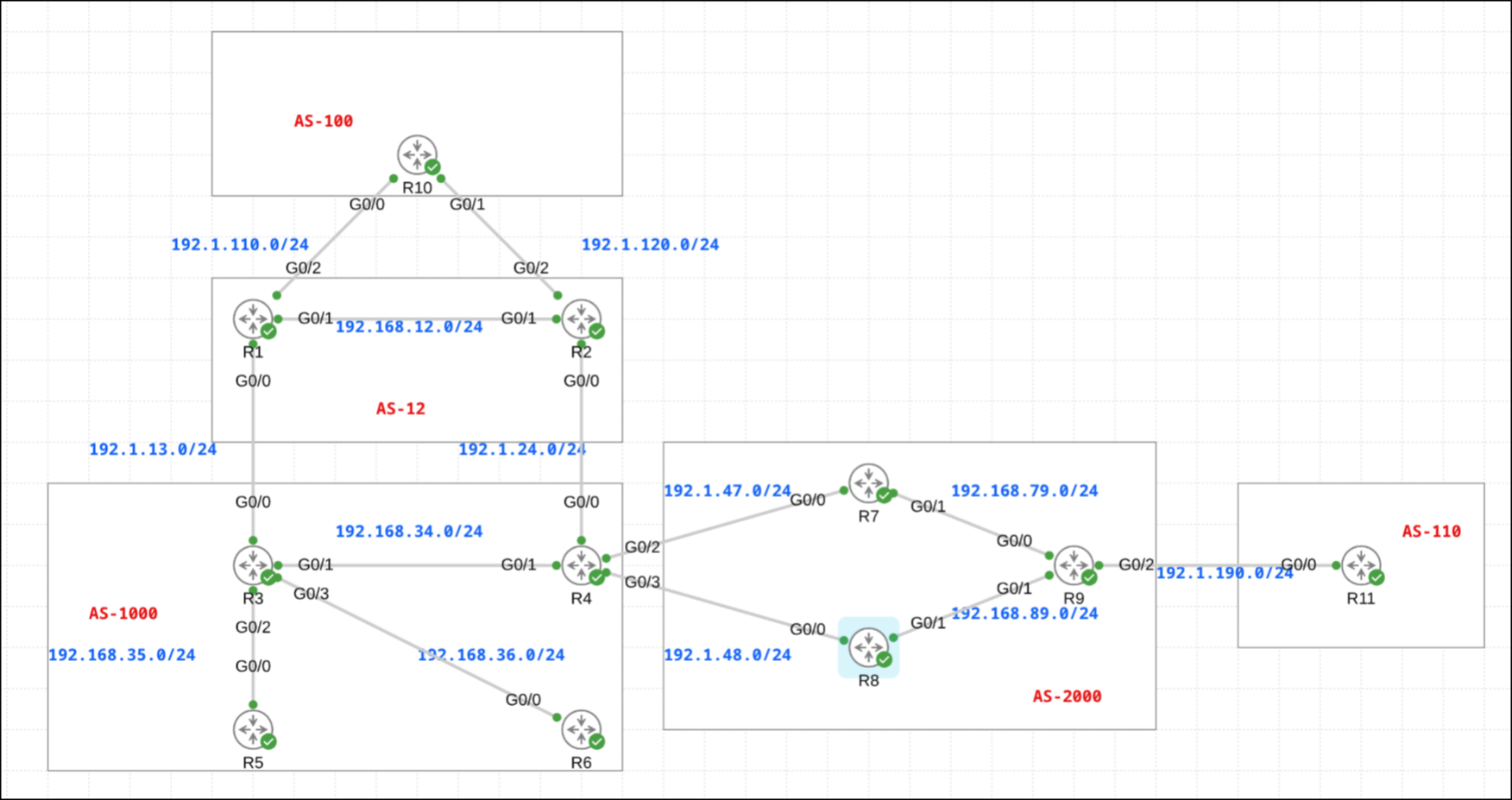
We’ll use three different scenarios:
- R10: Load balance across R1 and R2 (both eBGP)
- R9: Load balance across R7 and R8 (both iBGP)
- R3: Load balance across R1 (eBGP) and R4 (iBGP) - mixed
Example 1: eBGP Multipath
Requirement
R10 needs to be configured to use both R1 and R2 to reach the rest of the network. Configure R10 such that it load balances between R1 and R2. R1 and R2 are eBGP neighbors.
Translation:
- R10 has two eBGP peers: R1 and R2 (both in AS 12)
- Both paths should be active simultaneously
- Traffic should load balance across both links
Initial State (Before Multipath)
R10’s BGP table:
R10#sh ip bgp
     Network          Next Hop            Metric LocPrf Weight Path
 *    1.0.0.0          192.1.120.2                            0 12 i
 *>                    192.1.110.1              0             0 12 i
 *    2.0.0.0          192.1.120.2              0             0 12 i
 *>                    192.1.110.1                            0 12 i
R10 has two paths for each network:
- Via 192.1.120.2 (R2): Marked with
*(valid, not best) - Via 192.1.110.1 (R1): Marked with
*>(valid and best)
Why is R1 chosen? Looking at the paths:
- Network 1.0.0.0 via R1: MED=0
- Network 1.0.0.0 via R2: MED is blank (missing)
- Network 2.0.0.0 via R1: MED is blank
- Network 2.0.0.0 via R2: MED=0
The tie-breaking goes down the algorithm. Since both paths are eBGP with the same AS-Path, it likely comes down to IGP metric to next-hop or router-ID. R1 wins consistently.
R10’s routing table:
R10#sh ip route bgp
[Only R1's path installed - R2's path unused]
Only ONE path per prefix in the routing table. R2’s link is idle.
Configuration
Enable eBGP multipath on R10:
router bgp 100
 maximum-paths 2
That’s it! One command enables multipath for eBGP neighbors.
Syntax:
maximum-paths <1-32>

Default: 1 (single path only)
Range: 1-32 paths (platform dependent, often limited to 16)
Results After Multipath Configuration
R10’s BGP table:
R10#sh ip bgp
     Network          Next Hop            Metric LocPrf Weight Path
 *m   1.0.0.0          192.1.120.2                            0 12 i
 *>                    192.1.110.1              0             0 12 i
 *m   2.0.0.0          192.1.120.2              0             0 12 i
 *>                    192.1.110.1                            0 12 i
Key changes:
- Path via R2 now marked with
*m(valid, multipath) - Path via R1 still marked with
*>(valid, best) - Both paths are now active!
The m flag indicates multipath – this path is selected as an additional equal-cost path alongside the best path.
R10’s routing table:
R10#sh ip route bgp
B     1.0.0.0/8 [20/0] via 192.1.120.2, 00:02:45
                [20/0] via 192.1.110.1, 00:02:45
B     2.0.0.0/8 [20/0] via 192.1.120.2, 00:02:45
                [20/0] via 192.1.110.1, 00:02:45
Perfect! Both next-hops are installed for each prefix:
- 1.0.0.0/8: via 192.1.120.2 (R2) AND via 192.1.110.1 (R1)
- 2.0.0.0/8: via 192.1.120.2 (R2) AND via 192.1.110.1 (R1)
Traffic to these networks will now load balance across both R1 and R2 links.
Load Balancing Behavior
How does the router actually distribute traffic?
Per-destination load balancing (default):
Hash inputs: Source IP, Destination IP, Protocol, Source Port, Destination Port

Flow to 1.0.0.1 → Hash result → Use R1
Flow to 1.0.0.2 → Hash result → Use R2
Flow to 1.0.0.1 again → Same hash → Use R1 (consistent)
This is per-flow load balancing:
- Individual flows are sticky to one path
- Different flows may use different paths
- Prevents packet reordering within a flow
Result: Traffic distributes across both links, roughly 50/50 over time.
Example 2: iBGP Multipath
Requirement
R9 needs to be configured to use both R7 and R8 to reach the rest of the network. Configure R9 such that it load balances between R7 and R8. R7 and R8 are iBGP neighbors.
Translation:
- R9 has two iBGP peers: R7 and R8 (all in AS 2000)
- Both paths should be active simultaneously
- Traffic should load balance across both links
Initial State (Before Multipath)
R9’s BGP table:
R9#sh ip bgp
     Network          Next Hop            Metric LocPrf Weight Path
 * i  1.0.0.0          10.8.8.8                 0    100      0 1000 12 i
 *>i                   10.7.7.7                 0    100      0 1000 12 i
 * i  2.0.0.0          10.8.8.8                 0    100      0 1000 12 i
 *>i                   10.7.7.7                 0    100      0 1000 12 i
R9 has two paths for each network:
- Via 10.8.8.8 (R8): Marked with
*i(valid, internal, not best) - Via 10.7.7.7 (R7): Marked with
*>i(valid, internal, best)
Both paths are iBGP. The tie-breaking goes through the best-path algorithm, and R7 wins (likely due to IGP metric to next-hop or router-ID).
R9’s routing table:
R9#sh ip route bgp
[Only R7's path installed - R8's path unused]
Configuration
Enable iBGP multipath on R9:
router bgp 2000
 maximum-paths ibgp 2
Critical difference: For iBGP multipath, use the ibgp keyword.
Syntax:
maximum-paths ibgp <1-32>

Note: Separate from eBGP multipath configuration
Results After Multipath Configuration
R9’s BGP table:
R9#sh ip bgp
     Network          Next Hop            Metric LocPrf Weight Path
 *mi  1.0.0.0          10.8.8.8                 0    100      0 1000 12 i
 *>i                   10.7.7.7                 0    100      0 1000 12 i
 *mi  2.0.0.0          10.8.8.8                 0    100      0 1000 12 i
 *>i                   10.7.7.7                 0    100      0 1000 12 i
Key changes:
- Path via R8 now marked with
*mi(valid, multipath, internal) - Path via R7 still marked with
*>i(valid, best, internal) - Both iBGP paths are now active!
R9’s routing table:
R9#sh ip route bgp
B     1.0.0.0/8 [200/0] via 10.8.8.8, 00:01:23
                [200/0] via 10.7.7.7, 00:01:23
B     2.0.0.0/8 [200/0] via 10.8.8.8, 00:01:23
                [200/0] via 10.7.7.7, 00:01:23
Perfect! Both iBGP next-hops are installed:
- Administrative distance: 200 (iBGP)
- Next-hops: 10.8.8.8 (R8) and 10.7.7.7 (R7)
Traffic now load balances across both R7 and R8 links.
iBGP Multipath Considerations
Split-horizon warning: In iBGP full mesh, R9 may receive the same route from multiple iBGP peers, but iBGP split-horizon rules prevent R9 from advertising routes learned via iBGP to other iBGP peers.
Route reflector compatibility: If R9 is a route reflector (as in our topology), iBGP multipath works normally. If R9 is a route reflector client, ensure the RR is configured to reflect multiple paths.
Example 3: eiBGP Multipath (Mixed eBGP and iBGP)
Requirement
R3 needs to be configured to use both R1 and R4 to reach the rest of the network. Configure R3 such that it load balances between R1 and R4. R1 is an eBGP neighbor and R4 is an iBGP neighbor.
Translation:
- R3 has one eBGP peer: R1 (AS 12)
- R3 has one iBGP peer: R4 (both in AS 1000)
- Load balance across BOTH eBGP and iBGP paths simultaneously
This is the tricky scenario – mixing eBGP and iBGP paths.
Initial State (Before Multipath)
R3’s BGP table:
R3#sh ip bgp
     Network          Next Hop            Metric LocPrf Weight Path
 * i  1.0.0.0          192.168.34.4             0    100      0 12 i
 *>                    192.1.13.1               0             0 12 i
 *>   2.0.0.0          192.1.13.1                             0 12 i
 * i                   192.168.34.4             0    100      0 12 i
R3 has two paths for each network:
- Via 192.168.34.4 (R4): iBGP path, marked with
*i - Via 192.1.13.1 (R1): eBGP path, marked with
*>
Why does eBGP win? Step 7 in the best-path algorithm: eBGP is preferred over iBGP. Even though both paths have the same Weight, Local Preference, AS-Path length, etc., the eBGP path wins by default.
R3’s routing table:
R3#sh ip route bgp
[Only eBGP path via R1 installed - iBGP path via R4 unused]
Configuration
Enable eiBGP multipath on R3:
router bgp 1000
 maximum-paths eibgp 2
Critical keyword: eibgp (not ibgp, not the default)
Syntax:
maximum-paths eibgp <1-32>

Enables multipath across BOTH eBGP and iBGP paths
Warning: Can create routing loops if misconfigured
The Loop Warning
When you configure eibgp, Cisco IOS displays a warning:
R3(config-router)#maximum-paths eibgp 2
%BGP: This may cause traffic loop if not used properly (command accepted)
%BGP-4-MULTIPATH_LOOP: This may cause traffic loop if not used properly (command accepted).
Why the warning?
If R4 (iBGP peer) also has multipath configured and learns routes from R3, you can create a loop:
R3 learns route from R1 (eBGP) and R4 (iBGP)
R3 installs both paths via multipath
R3's traffic to R4 may use iBGP path → goes to R4

R4 learns route from R3 (iBGP) and external source
R4 installs both paths via multipath
R4's traffic back may use iBGP path → goes to R3

Result: R3 ↔ R4 loop for some traffic
Solution: Ensure your IGP metrics and AS topology prevent loops. Typically, this works safely when:
- eBGP paths are genuinely external (not via iBGP peers)
- Proper route reflector hierarchy exists
- You’re not creating transit scenarios through iBGP
Results After Multipath Configuration
R3’s BGP table:
R3#sh ip bgp
     Network          Next Hop            Metric LocPrf Weight Path
 *mi  1.0.0.0          192.168.34.4             0    100      0 12 i
 *>                    192.1.13.1               0             0 12 i
 *>   2.0.0.0          192.1.13.1                             0 12 i
 *mi                   192.168.34.4             0    100      0 12 i
Key changes:
- iBGP path via R4 now marked with
*mi(valid, multipath, internal) - eBGP path via R1 still marked with
*>(valid, best) - Mixed eBGP and iBGP paths are both active!
R3’s routing table:
R3#sh ip route bgp
B     1.0.0.0/8 [20/0] via 192.168.34.4, 00:01:41
                [20/0] via 192.1.13.1, 00:01:41
B     2.0.0.0/8 [20/0] via 192.168.34.4, 00:01:41
                [20/0] via 192.1.13.1, 00:01:41
Interesting! Both next-hops installed:
- 192.168.34.4 (R4, iBGP) – AD 20 shown (but actually learned via iBGP with AD 200)
- 192.1.13.1 (R1, eBGP) – AD 20 (eBGP)
The display shows AD 20 for both because CEF load balances based on the best path’s AD. Both are treated equally for forwarding purposes.
Traffic now load balances across both eBGP (R1) and iBGP (R4) links.
Requirements for Multipath Selection
For BGP to install multiple paths via multipath, the paths must be equal at the point where multipath evaluation occurs. Specifically:
Equal-Cost Requirements
Paths must tie through these best-path steps:
- ✓ Weight (must be equal)
- ✓ Local Preference (must be equal)
- ✓ Locally originated (both or neither)
- ✓ AS-Path length (must be equal)
- ✓ Origin type (must be equal)
- ✓ MED (must be equal for same-AS paths)
- ← Multipath evaluation happens here
If paths are equal through step 6, they’re candidates for multipath. The evaluation at step 7 (eBGP vs iBGP) depends on the multipath type:
maximum-paths <n>        → Only eBGP paths (step 7: all must be eBGP)
maximum-paths ibgp <n>   → Only iBGP paths (step 7: all must be iBGP)
maximum-paths eibgp <n>  → Mixed (step 7: can be eBGP or iBGP)
What Breaks Multipath?
Different AS-Path lengths:
Path 1: AS-Path = 200 100 (length 2)
Path 2: AS-Path = 200 100 100 (length 3)

Result: NOT equal-cost (step 4 differs)
        Only shortest path installed
Different Local Preferences:
Path 1: Local Preference = 200
Path 2: Local Preference = 100

Result: NOT equal-cost (step 2 differs)
        Only highest LP path installed
Different MEDs (when comparing same AS):
Path 1 from AS 200: MED = 50
Path 2 from AS 200: MED = 100

Result: NOT equal-cost (step 6 differs)
        Only lowest MED path installed
Mixed eBGP/iBGP without eibgp:
Path 1: eBGP
Path 2: iBGP
Config: maximum-paths 2 (eBGP only)

Result: Only eBGP path installed (step 7)
Multipath Configuration Matrix
Here’s a complete reference for all multipath scenarios:
| Scenario | Command | Effect | Use Case |
|---|---|---|---|
| eBGP only | maximum-paths 2 |
Load balance across eBGP peers | Dual ISP, dual peering |
| iBGP only | maximum-paths ibgp 2 |
Load balance across iBGP peers | Internal backbone links |
| Mixed eBGP+iBGP | maximum-paths eibgp 2 |
Load balance across both | Complex topologies (use carefully) |
| eBGP and iBGP separately | maximum-paths 2maximum-paths ibgp 2 |
Independent limits | Different path counts |