Introduction
The previous two posts in this series covered the two ends of the BGP aggregation spectrum:
- Default
aggregate-address: advertises both the aggregate AND all component routes to everyone summary-only: advertises only the aggregate, suppresses ALL component routes to everyone
But real networks rarely fit neatly into either extreme. What if you want to advertise the aggregate alongside some of the component routes, but suppress others? That’s exactly what suppress-map solves.
suppress-map gives you surgical control over which specific routes are suppressed when an aggregate is active, while leaving the rest free to be advertised normally alongside the summary.
The Problem suppress-map Solves
Imagine R-4 has four networks in the 104.1.4.0/22 range:
104.1.4.0/24
104.1.5.0/24
104.1.6.0/24
104.1.7.0/24
You want to advertise the aggregate 104.1.4.0/22 to all neighbors, but you also need 104.1.6.0/24 to remain visible as a specific route. Maybe it’s a customer-facing network that needs its own traffic engineering path, or it’s a DMZ that must be reachable even if the aggregate is withdrawn. The other three /24s, however, can be hidden behind the aggregate.
Neither summary-only nor the default behavior handles this cleanly:
summary-onlysuppresses ALL four specifics – too aggressive- Default aggregation advertises ALL four specifics – not selective enough
- Per-neighbor prefix lists can control what each neighbor sees, but the suppression logic still lives in the prefix list, not the aggregation itself
suppress-map handles this at the aggregation level: define exactly which routes to suppress, and everything else advertises normally alongside the aggregate.
Lab Topology
Same topology throughout this BGP series:
- AS 100: R-1
- AS 200: R-2, R-3, R-4 (iBGP full mesh)
- AS 500: R-5 (eBGP peer with R-3)
- AS 600: R-6 (eBGP peer with R-4)
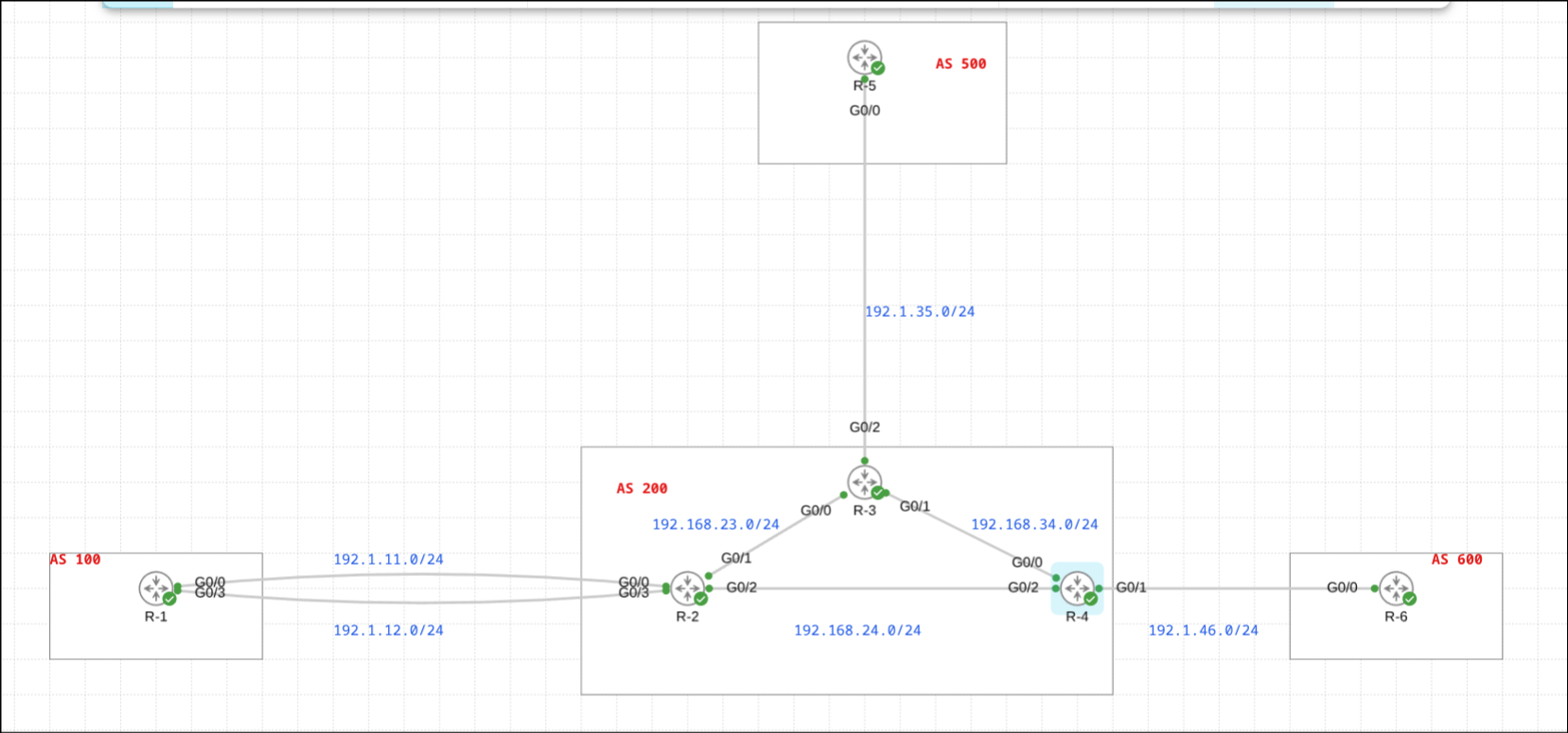
This scenario runs on R-4, which has four loopback interfaces:
104.1.4.0/24  ─── Loopback (to be suppressed)
104.1.5.0/24  ─── Loopback (to be suppressed)
104.1.6.0/24  ─── Loopback (to remain advertised)
104.1.7.0/24  ─── Loopback (to be suppressed)
Aggregate: 104.1.4.0/22
Goal: advertise the /22 aggregate plus only the 104.1.6.0/24 specific. Suppress the other three.
Initial State
Before any aggregation is configured, R-4’s BGP table shows all four /24 routes as normal active entries:
R-4(config-router)#do sh ip bgp | i 104.1.
 *>   104.1.4.0/24     0.0.0.0                  0         32768 i
 *>   104.1.5.0/24     0.0.0.0                  0         32768 i
 *>   104.1.6.0/24     0.0.0.0                  0         32768 i
 *>   104.1.7.0/24     0.0.0.0                  0         32768 i
All four routes carry *> (valid and best), and all four are being advertised to neighbors.
Configuration
The suppress-map approach requires three pieces working together: an access list to identify the routes to suppress, a route-map that matches them, and the aggregate-address command referencing that route-map.
Step 1: Define Which Routes to Suppress
Create a standard access list that matches the three /24s you want to suppress:
R-4(config)#access-list 4 permit 104.1.4.0 0.0.0.255
R-4(config)#access-list 4 permit 104.1.5.0 0.0.0.255
R-4(config)#access-list 4 permit 104.1.7.0 0.0.0.255
Notice that 104.1.6.0/24 is intentionally absent from this list. Routes matched by the access list will be suppressed. Routes not matched will continue to be advertised.
Verify:
R-4(config)#do sh access-list
Standard IP access list 4
    10 permit 104.1.4.0, wildcard bits 0.0.0.255
    20 permit 104.1.5.0, wildcard bits 0.0.0.255
    30 permit 104.1.7.0, wildcard bits 0.0.0.255
Step 2: Create the Route-Map
Create a route-map that matches the access list. Note that no set clause is needed here – the route-map is only used for matching, not for modifying attributes:
R-4(config)#route-map SM permit 10
R-4(config-route-map)#match ip address 4
The route-map name SM (for Suppress-Map) will be referenced directly in the aggregate command. Routes that match this route-map will be suppressed.
Step 3: Apply suppress-map to the Aggregate
R-4(config-router)#aggregate-address 104.1.4.0 255.255.252.0 suppress-map SM
This single command:
- Creates the 104.1.4.0/22 aggregate route
- Suppresses any component route that matches route-map SM
- Leaves all other component routes (104.1.6.0/24) advertised normally
Results
R-4’s Local BGP Table
R-4#sh ip bgp | i 104.1.
 s>   104.1.4.0/24     0.0.0.0                  0         32768 i
 *>   104.1.4.0/22     0.0.0.0                            32768 i
 s>   104.1.5.0/24     0.0.0.0                  0         32768 i
 *>   104.1.6.0/24     0.0.0.0                  0         32768 i
 s>   104.1.7.0/24     0.0.0.0                  0         32768 i
Reading the output:
s>on 104.1.4.0/24, 104.1.5.0/24, 104.1.7.0/24 – suppressed, matched the route-map, not advertised*>on 104.1.4.0/22 – the aggregate, active and advertised*>on 104.1.6.0/24 – not suppressed, not in the route-map, advertised normally
Exactly the behavior we wanted. R-4 locally retains full knowledge of all five routes, but only advertises two of them outward.
eBGP Neighbor (R-6 in AS 600)
R-6#sh ip bgp | i 104.1.
 *>   104.1.4.0/22     192.1.46.4               0             0 200 i
 *>   104.1.6.0/24     192.1.46.4               0             0 200 i
R-6 receives exactly two routes: the /22 aggregate and the one unsuppressed specific. The other three /24s are invisible to R-6, hidden behind the aggregate.
iBGP Neighbor (R-3 in AS 200)
R-3#sh ip bgp | i 104.1.
 *>i  104.1.4.0/22     10.4.4.4                 0    100      0 i
 *>i  104.1.6.0/24     10.4.4.4                 0    100      0 i
R-3 sees the identical picture – the aggregate plus the single unsuppressed specific. The i flag confirms these arrived via iBGP, with next-hop 10.4.4.4 (R-4’s loopback).
Importantly, suppress-map – like summary-only – applies uniformly to all neighbors. Both iBGP and eBGP peers receive the same selective view.
How suppress-map Matching Works
It’s worth being precise about the matching logic, because it’s the inverse of what you might initially expect:
Route matches suppress-map route-map? → SUPPRESS (do not advertise)
Route does NOT match suppress-map?    → ADVERTISE normally
This is different from how route-maps work in other BGP contexts (like neighbor route-maps), where a permit means “allow this route through.” Here, a permit in the route-map means “this route should be suppressed.”
The route-map itself must be a permit statement. A deny in the suppress-map route-map means “do not suppress this route” (i.e., let it through normally). In practice, most suppress-map configurations use a simple single-entry permit route-map.