BGP on Cilium: Peering Kubernetes with a Leaf‑Spine Datacenter
BGP is not just the routing protocol that powers the Internet — it has become the standard control plane inside modern data centers.
Today’s data centers are typically built using a leaf–spine architecture, where BGP is responsible for distributing reachability information between racks, spines, and endpoints. And when your endpoints are Kubernetes Pods, it makes perfect sense for Kubernetes networking to speak BGP as well.
That’s exactly where Cilium comes in.
In this post, we’ll walk through a hands‑on lab where we enable BGP on Cilium, peer Kubernetes nodes directly with a virtual leaf–spine fabric, and verify real end‑to‑end Pod connectivity across racks.
Lab Overview
In this lab we build a small but realistic virtual data center:
-
A core router (spine)
-
Two Top‑of‑Rack (ToR) switches
-
A Kubernetes cluster with:
- 1 control‑plane node
- 3 worker nodes
-
Nodes logically split across two racks
-
Cilium as the CNI, running in native routing mode
-
BGP peering between Kubernetes nodes and ToR switches
The goal is simple:
Kubernetes Pods in different racks should be reachable using routes learned dynamically via BGP.
Why BGP with Cilium?
Cilium’s BGP support allows Kubernetes nodes to advertise Pod CIDRs directly into your data center fabric.
That means:
- No overlays required
- No static routes
- No NAT between racks
- Your DC fabric becomes Pod‑aware
With the BGP v2 control plane (introduced in Cilium 1.16), this is configured entirely via Kubernetes CRDs — clean, declarative, and GitOps‑friendly.
Topology
At a high level, the topology looks like this:
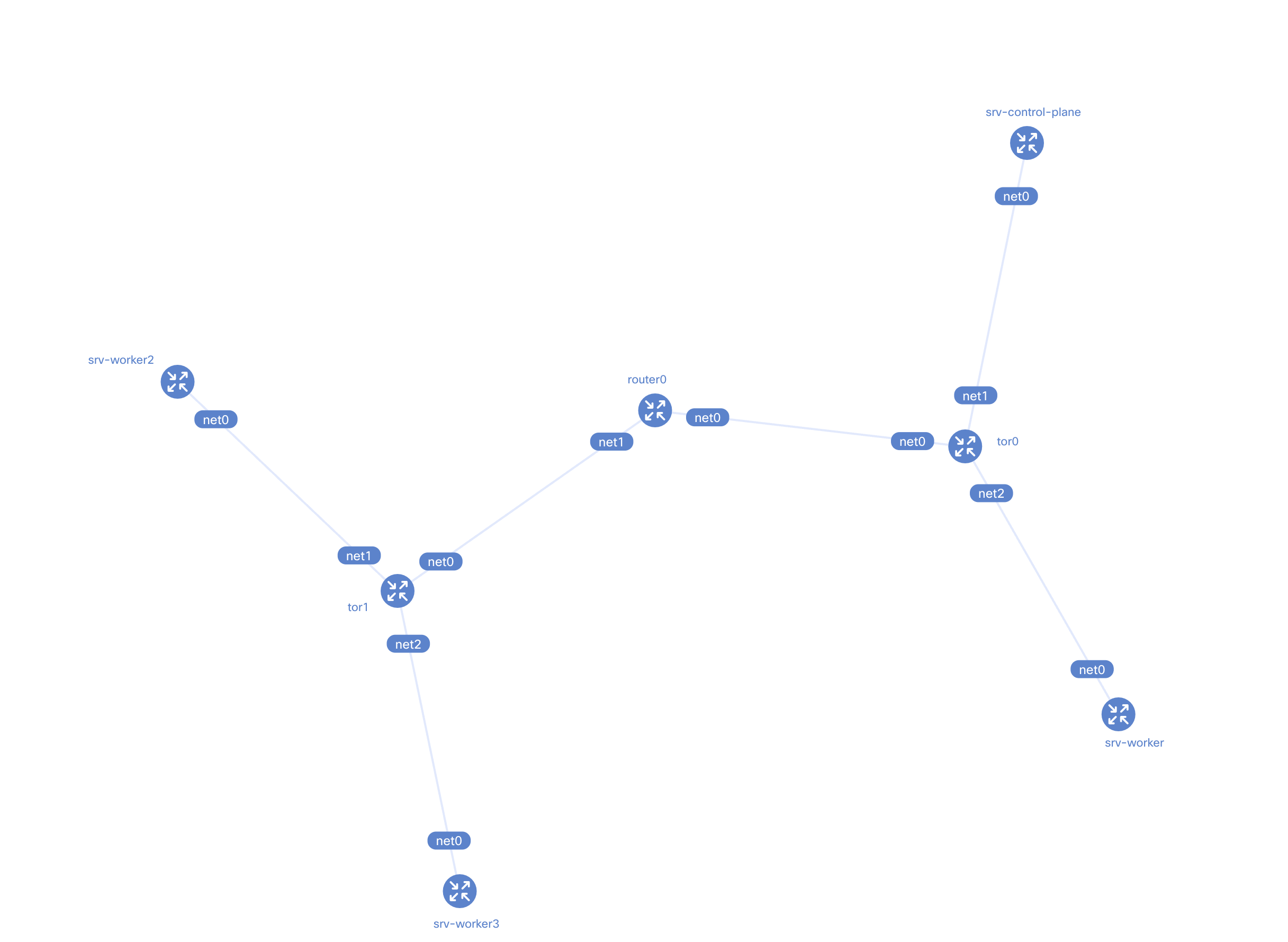
- A spine router peers with two ToR switches
- Each ToR switch peers with Kubernetes nodes in its rack
- Kubernetes nodes advertise their Pod CIDRs using BGP
Each rack maps to its own ASN:
- Rack 0 → AS 65010
- Rack 1 → AS 65011
- Core → AS 65000
This mirrors how real data centers are commonly built.
Kubernetes Cluster Setup (Kind)
We deploy Kubernetes using kind, with CNI disabled so that Cilium can be installed manually.
cluster.yamlkind: Cluster
name: kind
apiVersion: kind.x-k8s.io/v1alpha4
networking:
disableDefaultCNI: true
podSubnet: "10.1.0.0/16"
nodes:
- role: control-plane
kubeadmConfigPatches:
- |
kind: InitConfiguration
nodeRegistration:
kubeletExtraArgs:
node-ip: "10.0.1.2"
node-labels: "rack=rack0"
- role: worker
kubeadmConfigPatches:
- |
kind: JoinConfiguration
nodeRegistration:
kubeletExtraArgs:
node-ip: "10.0.2.2"
node-labels: "rack=rack0"
- role: worker
kubeadmConfigPatches:
- |
kind: JoinConfiguration
nodeRegistration:
kubeletExtraArgs:
node-ip: "10.0.3.2"
node-labels: "rack=rack1"
- role: worker
kubeadmConfigPatches:
- |
kind: JoinConfiguration
nodeRegistration:
kubeletExtraArgs:
node-ip: "10.0.4.2"
node-labels: "rack=rack1"
containerdConfigPatches:
- |-
[plugins."io.containerd.grpc.v1.cri".registry.mirrors."localhost:5000"]
endpoint = ["http://kind-registry:5000"]
Each node is labeled with its rack:
node-labels: "rack=rack0"
node-labels: "rack=rack1"
These labels are critical — Cilium uses them later to decide which nodes should peer with which ToR switch.
Building the Datacenter Fabric with Containerlab
To simulate the data center network, we use containerlab with FRRouting (FRR).
The topology includes:
router0– the core router (spine)tor0– Top of Rack for rack0tor1– Top of Rack for rack1
Each device runs FRR and establishes BGP sessions using:
- eBGP between spine and ToRs
- iBGP between ToRs and Kubernetes nodes
Once deployed, we can already see the fabric forming:
bgp-topo.yamlname: bgp-topo
topology:
kinds:
linux:
cmd: bash
nodes:
router0:
kind: linux
image: frrouting/frr:v8.2.2
labels:
app: frr
exec:
# NAT everything in here to go outside of the lab
- iptables -t nat -A POSTROUTING -o eth0 -j MASQUERADE
# Loopback IP (IP address of the router itself)
- ip addr add 10.0.0.0/32 dev lo
# Terminate rest of the 10.0.0.0/8 in here
- ip route add blackhole 10.0.0.0/8
# Boiler plate to make FRR work
- touch /etc/frr/vtysh.conf
- sed -i -e 's/bgpd=no/bgpd=yes/g' /etc/frr/daemons
- /usr/lib/frr/frrinit.sh start
# FRR configuration
- >-
vtysh -c 'conf t' -c 'frr defaults datacenter' -c 'router bgp 65000' -c ' bgp router-id 10.0.0.0' -c ' no bgp ebgp-requires-policy' -c ' neighbor ROUTERS peer-group' -c ' neighbor ROUTERS remote-as external' -c ' neighbor ROUTERS default-originate' -c ' neighbor net0 interface peer-group ROUTERS' -c ' neighbor net1 interface peer-group ROUTERS' -c ' address-family ipv4 unicast' -c ' redistribute connected' -c ' exit-address-family' -c '!'
tor0:
kind: linux
image: frrouting/frr:v8.2.2
labels:
app: frr
exec:
- ip link del eth0
- ip addr add 10.0.0.1/32 dev lo
- ip addr add 10.0.1.1/24 dev net1
- ip addr add 10.0.2.1/24 dev net2
- touch /etc/frr/vtysh.conf
- sed -i -e 's/bgpd=no/bgpd=yes/g' /etc/frr/daemons
- /usr/lib/frr/frrinit.sh start
- >-
vtysh -c 'conf t' -c 'frr defaults datacenter' -c 'router bgp 65010' -c ' bgp router-id 10.0.0.1' -c ' no bgp ebgp-requires-policy' -c ' neighbor ROUTERS peer-group' -c ' neighbor ROUTERS remote-as external' -c ' neighbor SERVERS peer-group' -c ' neighbor SERVERS remote-as internal' -c ' neighbor net0 interface peer-group ROUTERS' -c ' neighbor 10.0.1.2 peer-group SERVERS' -c ' neighbor 10.0.2.2 peer-group SERVERS' -c ' address-family ipv4 unicast' -c ' redistribute connected' -c ' exit-address-family' -c '!'
tor1:
kind: linux
image: frrouting/frr:v8.2.2
labels:
app: frr
exec:
- ip link del eth0
- ip addr add 10.0.0.2/32 dev lo
- ip addr add 10.0.3.1/24 dev net1
- ip addr add 10.0.4.1/24 dev net2
- touch /etc/frr/vtysh.conf
- sed -i -e 's/bgpd=no/bgpd=yes/g' /etc/frr/daemons
- /usr/lib/frr/frrinit.sh start
- >-
vtysh -c 'conf t' -c 'frr defaults datacenter' -c 'router bgp 65011' -c ' bgp router-id 10.0.0.2' -c ' bgp bestpath as-path multipath-relax' -c ' no bgp ebgp-requires-policy' -c ' neighbor ROUTERS peer-group' -c ' neighbor ROUTERS remote-as external' -c ' neighbor SERVERS peer-group' -c ' neighbor SERVERS remote-as internal' -c ' neighbor net0 interface peer-group ROUTERS' -c ' neighbor 10.0.3.2 peer-group SERVERS' -c ' neighbor 10.0.4.2 peer-group SERVERS' -c ' address-family ipv4 unicast' -c ' redistribute connected' -c ' exit-address-family' -c '!'
srv-control-plane:
kind: linux
image: nicolaka/netshoot:latest
network-mode: container:kind-control-plane
exec:
# Cilium currently doesn't support BGP Unnumbered
- ip addr add 10.0.1.2/24 dev net0
# Cilium currently doesn't support importing routes
- ip route replace default via 10.0.1.1
srv-worker:
kind: linux
image: nicolaka/netshoot:latest
network-mode: container:kind-worker
exec:
- ip addr add 10.0.2.2/24 dev net0
- ip route replace default via 10.0.2.1
srv-worker2:
kind: linux
image: nicolaka/netshoot:latest
network-mode: container:kind-worker2
exec:
- ip addr add 10.0.3.2/24 dev net0
- ip route replace default via 10.0.3.1
srv-worker3:
kind: linux
image: nicolaka/netshoot:latest
network-mode: container:kind-worker3
exec:
- ip addr add 10.0.4.2/24 dev net0
- ip route replace default via 10.0.4.1
links:
- endpoints: ["router0:net0", "tor0:net0"]
- endpoints: ["router0:net1", "tor1:net0"]
- endpoints: ["tor0:net1", "srv-control-plane:net0"]
- endpoints: ["tor0:net2", "srv-worker:net0"]
- endpoints: ["tor1:net1", "srv-worker2:net0"]
- endpoints: ["tor1:net2", "srv-worker3:net0"]
containerlab -t topo.yaml deploy
And from the core router:
show bgp ipv4 summary wide
❯ docker exec -it clab-bgp-topo-router0 vtysh -c 'show bgp ipv4 summary wide'

IPv4 Unicast Summary (VRF default):
BGP router identifier 10.0.0.0, local AS number 65000 vrf-id 0
BGP table version 12
RIB entries 23, using 4232 bytes of memory
Peers 2, using 1433 KiB of memory
Peer groups 1, using 64 bytes of memory

Neighbor        V         AS    LocalAS   MsgRcvd   MsgSent   TblVer  InQ OutQ  Up/Down State/PfxRcd   PfxSnt Desc
tor0(net0)      4      65010      65000      4920      4919        0    0    0 04:05:24            5       13 N/A
tor1(net1)      4      65011      65000      4920      4920        0    0    0 04:05:24            5       13 N/A

Total number of neighbors 2
The spine successfully peers with both ToRs — our virtual DC backbone is alive.
Installing Cilium with BGP Enabled
Now the fun part.
We install Cilium with:
- Native routing
- Kubernetes IPAM
- BGP control plane enabled
cilium install \
  --version v1.19.0-rc.0 \
  --set ipam.mode=kubernetes \
  --set routingMode=native \
  --set ipv4NativeRoutingCIDR="10.0.0.0/8" \
  --set bgpControlPlane.enabled=true \
  --set k8s.requireIPv4PodCIDR=true
And confirm:
cilium config view | grep enable-bgp

enable-bgp-control-plane                          true
enable-bgp-control-plane-status-report            true
enable-bgp-legacy-origin-attribute                false
BGP is officially on 🔥
Cilium BGP Configuration Model
Cilium’s BGP v2 control plane uses three CRDs:
- CiliumBGPClusterConfig – defines BGP instances and peers
- CiliumBGPPeerConfig – defines address families and behavior
- CiliumBGPAdvertisement – defines what gets advertised
This separation makes the configuration extremely flexible.
Defining Rack‑Aware BGP Peering
We define two CiliumBGPClusterConfig resources:
- One for
rack0 - One for
rack1
Each config:
- Selects nodes via
racklabels - Assigns a rack‑specific ASN
- Peers with the corresponding ToR loopback IP
Example (rack0):
nodeSelector:
  matchLabels:
    rack: rack0
localASN: 65010
peerAddress: 10.0.0.1
We then define a CiliumBGPAdvertisement that advertises:
- PodCIDR routes
cilium-bgp-peering-policies.yaml---
apiVersion: "cilium.io/v2"
kind: CiliumBGPClusterConfig
metadata:
name: rack0
spec:
nodeSelector:
matchLabels:
rack: rack0
bgpInstances:
- name: "instance-65010"
localASN: 65010
peers:
- name: "peer-65010-rack0"
peerASN: 65010
peerAddress: "10.0.0.1"
peerConfigRef:
name: "peer-config-generic"
---
apiVersion: "cilium.io/v2"
kind: CiliumBGPClusterConfig
metadata:
name: rack1
spec:
nodeSelector:
matchLabels:
rack: rack1
bgpInstances:
- name: "instance-65011"
localASN: 65011
peers:
- name: "peer-65011-rack1"
peerASN: 65011
peerAddress: "10.0.0.2"
peerConfigRef:
name: "peer-config-generic"
---
apiVersion: "cilium.io/v2"
kind: CiliumBGPPeerConfig
metadata:
name: peer-config-generic
spec:
families:
- afi: ipv4
safi: unicast
advertisements:
matchLabels:
advertise: "pod-cidr"
---
apiVersion: "cilium.io/v2"
kind: CiliumBGPAdvertisement
metadata:
name: pod-cidr
labels:
advertise: pod-cidr
spec:
advertisements:
- advertisementType: "PodCIDR"
That’s it. No per‑node config. No static routing. Just labels.
Verifying BGP Sessions
After applying the policies:
kubectl apply -f cilium-bgp-peering-policies.yaml
We immediately see Kubernetes nodes forming BGP sessions with the ToR switches.
From tor0:
show bgp ipv4 summary wide
❯ docker exec -it clab-bgp-topo-tor0 vtysh -c 'show bgp ipv4 summary wide'

IPv4 Unicast Summary (VRF default):
BGP router identifier 10.0.0.1, local AS number 65010 vrf-id 0
BGP table version 13
RIB entries 23, using 4232 bytes of memory
Peers 3, using 2149 KiB of memory
Peer groups 2, using 128 bytes of memory

Neighbor                     V         AS    LocalAS   MsgRcvd   MsgSent   TblVer  InQ OutQ  Up/Down State/PfxRcd   PfxSnt Desc
router0(net0)                4      65000      65010      4593      4595        0    0    0 03:49:05            8       13 N/A
kind-control-plane(10.0.1.2) 4      65010      65010      4486      4492        0    0    0 03:44:11            1       11 N/A
kind-worker(10.0.2.2)        4      65010      65010      4486      4492        0    0    0 03:44:12            1       11 N/A

Total number of neighbors 3
The ToR now peers with:
kind-control-planekind-worker
And receives Pod CIDR routes dynamically 🎯
The same happens on tor1 for rack1 workers.
❯ docker exec -it clab-bgp-topo-tor1 vtysh -c 'show bgp ipv4 summary wide'

IPv4 Unicast Summary (VRF default):
BGP router identifier 10.0.0.2, local AS number 65011 vrf-id 0
BGP table version 13
RIB entries 23, using 4232 bytes of memory
Peers 3, using 2149 KiB of memory
Peer groups 2, using 128 bytes of memory

Neighbor               V         AS    LocalAS   MsgRcvd   MsgSent   TblVer  InQ OutQ  Up/Down State/PfxRcd   PfxSnt Desc
router0(net0)          4      65000      65011      4591      4592        0    0    0 03:48:59            8       13 N/A
kind-worker2(10.0.3.2) 4      65011      65011      4484      4490        0    0    0 03:44:06            1       11 N/A
kind-worker3(10.0.4.2) 4      65011      65011      4484      4490        0    0    0 03:44:06            1       11 N/A

Total number of neighbors 3
End‑to‑End Connectivity Test
To validate everything, we deploy netshoot as a DaemonSet.
netshoot-ds.yamlapiVersion: apps/v1
kind: DaemonSet
metadata:
name: netshoot
spec:
selector:
matchLabels:
app: netshoot
template:
metadata:
labels:
app: netshoot
spec:
tolerations:
- key: node-role.kubernetes.io/master
operator: Exists
effect: NoSchedule
containers:
- name: netshoot
image: nicolaka/netshoot:latest
command: ["sleep", "infinite"]
This gives us a debugging Pod on every node.
❯ kubectl rollout status ds/netshoot -w
daemon set "netshoot" successfully rolled out

❯ k get pods
NAME             READY   STATUS    RESTARTS   AGE
netshoot-ffssl   1/1     Running   0          95s
netshoot-q7l9l   1/1     Running   0          95s
netshoot-rnm8n   1/1     Running   0          95s
We then:
- Pick a source Pod in rack0
- Pick a destination Pod in rack1
- Ping across racks
❯ SRC_POD=$(kubectl get pods -o wide | grep "kind-worker " | awk '{ print($1); }')

❯ DST_IP=$(kubectl get pods -o wide | grep worker3 | awk '{ print($6); }')

❯ kubectl exec -it $SRC_POD -- ping -c 10 $DST_IP
PING 10.1.1.142 (10.1.1.142) 56(84) bytes of data.
64 bytes from 10.1.1.142: icmp_seq=1 ttl=58 time=0.235 ms
64 bytes from 10.1.1.142: icmp_seq=2 ttl=58 time=0.149 ms
64 bytes from 10.1.1.142: icmp_seq=3 ttl=58 time=0.284 ms
64 bytes from 10.1.1.142: icmp_seq=4 ttl=58 time=0.188 ms
^C
--- 10.1.1.142 ping statistics ---
4 packets transmitted, 4 received, 0% packet loss, time 3097ms
rtt min/avg/max/mdev = 0.149/0.214/0.284/0.050 ms
❯ kubectl exec -it $SRC_POD -- traceroute $DST_IP
traceroute to 10.1.1.142 (10.1.1.142), 30 hops max, 46 byte packets
 1  10.1.3.115 (10.1.3.115)  0.008 ms  0.064 ms  0.008 ms
 2  10.0.2.1 (10.0.2.1)  0.008 ms  0.009 ms  0.009 ms
 3  10.0.0.0 (10.0.0.0)  0.109 ms  0.009 ms  0.008 ms
 4  10.0.0.2 (10.0.0.2)  0.007 ms  0.009 ms  0.008 ms
 5  10.0.4.2 (10.0.4.2)  0.008 ms  0.009 ms  0.008 ms
 6  *  *  *
 7  10.1.1.142 (10.1.1.142)  0.009 ms  0.009 ms  0.008 ms
And… success 🎉
Packets traverse:
Pod → Node → ToR → Spine → ToR → Node → Pod
All driven by BGP‑learned routes.
What We Achieved
By the end of this lab, we have:
- A Kubernetes cluster integrated directly into a DC fabric
- Dynamic Pod CIDR advertisement via BGP
- Rack‑aware routing using node labels
- No overlays, no tunnels, no hacks
This is exactly how Kubernetes networking should look in a modern data center.
Final Thoughts
Cilium’s BGP support is a huge step forward for:
- Bare‑metal Kubernetes
- On‑prem data centers
- Hybrid cloud networking
If your network already speaks BGP — and it almost certainly does — Cilium lets Kubernetes become a first‑class citizen of that network.
Happy routing 🚀