BGP Route Filtering with Prefix Lists
Introduction
In my previous post, I explored BGP route filtering using standard Access Control Lists (ACLs). While ACLs are powerful, they have limitations when it comes to matching based on prefix length. Enter prefix lists – a purpose-built tool for route filtering that offers superior control and readability for BGP route manipulation.
Prefix lists provide functionality that ACLs simply cannot match: the ability to filter routes based on both network address AND prefix length. This makes them the preferred choice for BGP route filtering in production networks.
In this post, I’ll demonstrate three practical scenarios using the same lab topology, but this time leveraging prefix lists to achieve more elegant and maintainable filtering solutions.
Why Prefix Lists Over ACLs?
Before diving into the examples, let’s understand why prefix lists are superior for BGP route filtering:
Advantages of Prefix Lists
- Prefix-length aware: Can match based on subnet mask (e.g., “only /24 networks”)
- More readable: Configuration clearly shows network and mask ranges
- Better performance: Optimized for route lookups
- Explicit sequences: Each entry has a sequence number for easy editing
- BGP-specific: Designed specifically for routing protocol filtering
Prefix List Operators
Prefix lists use three key operators:
- le (less than or equal): Matches prefix lengths up to and including specified value
- ge (greater than or equal): Matches prefix lengths from specified value and above
- Exact match: When neither ge nor le is specified
The syntax is: ip prefix-list NAME [seq #] {permit|deny} network/length [ge #] [le #]
Lab Topology
The topology remains identical to my ACL post:
- AS 100: R-1 (edge router)
- AS 200: R-2, R-3, R-4 (iBGP mesh)
- AS 500: R-5 (connected to R-3)
- AS 600: R-6 (connected to R-4)
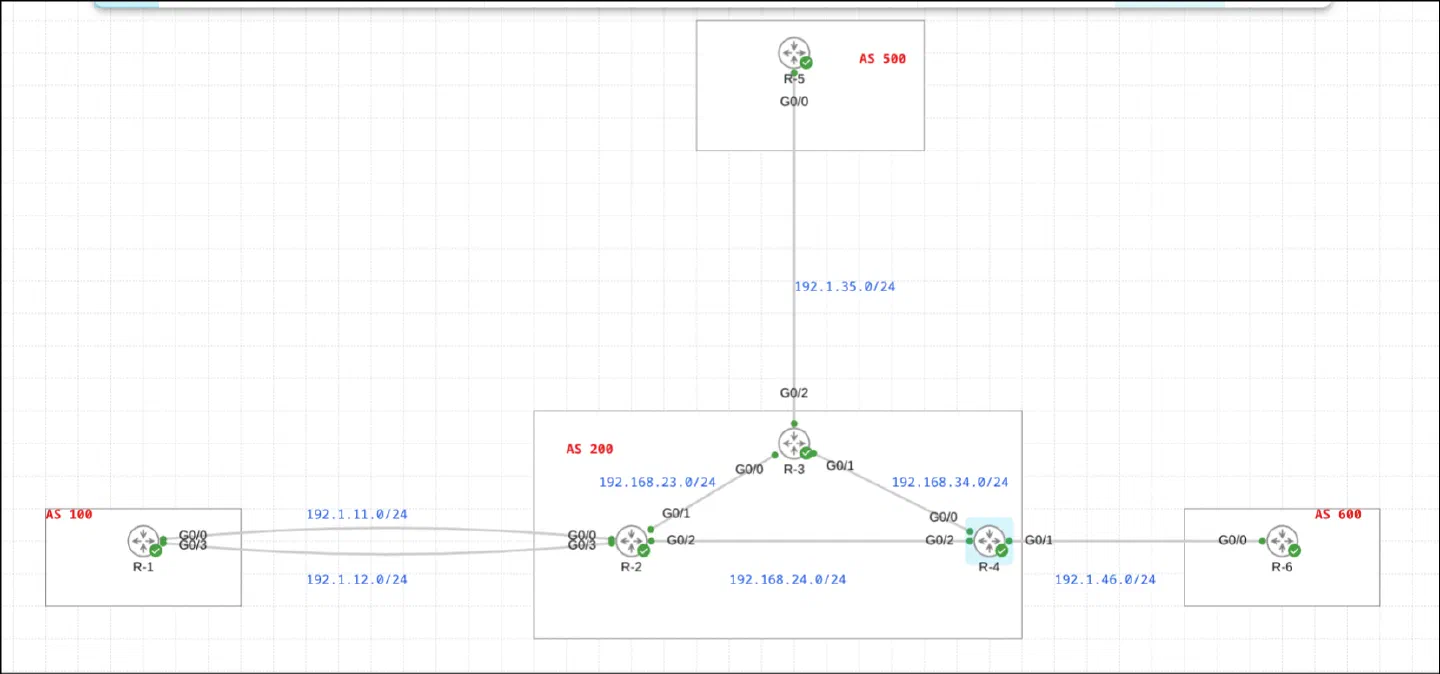
Case 1: Blocking Entire Major Network (All 11.x.x.x Prefixes)
Scenario
R-1 in AS 100 is advertising multiple networks to R-2, including:
- 1.0.0.0/8
- 11.11.11.0/24
- 11.11.111.0/24
- 111.0.0.0/8
The requirement is to block ALL prefixes within the 11.0.0.0/8 major network from being advertised to R-2, regardless of their specific subnet mask.
Configuration
R-1’s loopback interfaces include networks in the 11.0.0.0 range:
R-1’s BGP configuration advertises these networks:
Now, here’s the elegant prefix list solution on R-1:
Let me break down this prefix list:
Sequence 5: deny 11.0.0.0/8 le 32
- Matches the 11.0.0.0/8 network
le 32means “match prefix lengths from /8 up to and including /32”- This catches ALL possible subnets within 11.0.0.0/8 (11.0.0.0/8, 11.1.0.0/16, 11.11.11.0/24, 11.11.11.11/32, etc.)
Sequence 10: permit 0.0.0.0/0 le 32
- Matches any network (0.0.0.0/0)
le 32means “match any prefix length up to /32”- This is the “permit all” statement
Results
Before applying the prefix list, R-2 received all routes from R-1:
After applying the prefix list on R-1 and performing a soft reset:
Perfect! Both 11.11.11.0/24 and 11.11.111.0/24 were filtered out, while 111.0.0.0/8 (which doesn’t match 11.0.0.0/8) passed through.
Key Takeaway
With a single prefix-list entry using the le operator, we blocked an entire major network and all its possible subnets. Try doing that efficiently with ACLs – you’d need dozens of entries to cover all possible subnet combinations!
Case 2: Filtering Based on Prefix Length (Greater Than /27)
Scenario
R-5 in AS 500 is redistributing connected routes from multiple loopback interfaces in the 175.1.0.0/16 range:
- 175.1.1.0/24 (valid - /24)
- 175.1.2.16/28 (block - greater than /27)
- 175.1.3.32/27 (valid - exactly /27)
- 175.1.4.16/29 (block - greater than /27)
The requirement is to filter out any subnets of 175.1.0.0/16 with a prefix length greater than /27 (i.e., /28, /29, /30, /31, /32).
Configuration
R-5’s loopback configuration:
The route-map for redistribution (filters which connected routes get redistributed):
Now, the prefix list to filter on prefix length:
Breaking down this prefix list:
Sequence 5: deny 175.1.0.0/16 ge 28
- Matches the 175.1.0.0/16 network
ge 28means “greater than or equal to /28”- This denies 175.1.0.0/16 subnets with prefix lengths of /28, /29, /30, /31, or /32
- Networks with /24, /25, /26, or /27 will NOT match this entry
Sequence 10: permit 0.0.0.0/0 le 32
- Permits everything else
Results
Before applying the prefix list, R-3 received all four 175.1.x.x routes:
After applying the prefix list on R-5:
Exactly what we wanted! The /28 and /29 networks were filtered out, while the /24 and /27 networks passed through.
Key Takeaway
The ge (greater than or equal) operator allows precise filtering based on prefix length within a specific network range. This is impossible to achieve cleanly with standard ACLs.
Case 3: Global Prefix Length Filtering (Any Network > /24)
Scenario
Building on Case 2, we now have a more aggressive requirement: block ANY network from ANY address space that has a prefix length greater than /24.
This is a common real-world scenario where you want to:
- Prevent overly-specific routes from cluttering the BGP table
- Enforce routing policy that only accepts aggregate routes
- Reduce routing table size and improve stability
Configuration
The beauty of prefix lists shines here with an incredibly simple two-line configuration:
Let’s analyze this prefix list:
Sequence 5: deny 0.0.0.0/0 ge 25
- Matches ANY network (0.0.0.0/0)
ge 25means “greater than or equal to /25”- This denies ALL routes with prefix lengths of /25 or longer
- Effectively blocks /25, /26, /27, /28, /29, /30, /31, and /32 networks from ANY address space
Sequence 10: permit 0.0.0.0/0 le 32
- Permits everything else (but only /0 through /24 will reach this statement)
Results
Before applying the global prefix length filter, R-3’s BGP table included routes with various prefix lengths:
After applying PL-24 on R-5:
Notice that 175.1.3.32/27 disappeared! The global filter successfully removed all routes with prefix lengths greater than /24, regardless of the network address.
Key Takeaway
Using 0.0.0.0/0 ge 25 creates a universal filter that applies to all networks based purely on prefix length. This is incredibly powerful for enforcing routing policies across your entire network with just one statement.
Understanding ge and le: A Deep Dive
The ge (greater than or equal) and le (less than or equal) operators are what make prefix lists so powerful. Let’s break down the logic:
Prefix List Matching Logic
A prefix list entry matches if:
- The network portion matches the specified prefix
- The prefix length falls within the specified range
The range is determined by:
- Lower bound: The prefix length specified in the entry (e.g., /16 in
175.1.0.0/16) - Upper bound: Determined by
leoperator (or 32 if not specified) - Restricted by: The
geoperator, which sets a minimum prefix length
Examples with ge/le
- Matches: 10.0.0.0/8 through 10.0.0.0/24
- Matches: 10.1.0.0/16, 10.1.1.0/24
- Does NOT match: 10.1.1.0/25 (greater than /24)
- Matches: 10.0.0.0/24 through 10.0.0.0/32
- Matches: 10.1.1.0/24, 10.1.1.1/32
- Does NOT match: 10.1.0.0/16 (less than /24)
- Matches: 10.0.0.0/16 through 10.0.0.0/24
- Matches: 10.1.0.0/16, 10.1.1.0/24
- Does NOT match: 10.0.0.0/8 (less than /16) or 10.1.1.0/25 (greater than /24)
- Matches: ONLY 10.0.0.0/8 (exact match)
- Does NOT match: Any other prefix length
The “Permit Any” Statement
The universal permit statement in prefix lists:
This matches:
- Any network (0.0.0.0/0 matches all addresses)
- Any prefix length from /0 to /32
Prefix Lists vs ACLs: Side-by-Side Comparison
Let’s compare the approaches for the same filtering requirements:
Filtering 11.0.0.0/8 and all subnets
ACL approach:
Prefix list approach:
Filtering routes greater than /24
ACL approach:
Prefix list approach:
Best Practices for Prefix Lists
1. Use Descriptive Names
Instead of generic names like “PL-1”, use names that describe the purpose:
2. Use Sequence Numbers for Easy Editing
Sequence numbers allow you to insert, delete, or modify individual entries:
3. Always Include Explicit Permit
Unlike ACLs, prefix lists have an implicit “deny all” at the end. Always include an explicit permit statement:
4. Document Complex Logic
Add comments for complex prefix lists:
5. Test Before Deploying to Production
Use the show ip prefix-list detail command to verify your configuration, and test in a lab environment first:
6. Use Soft Reset for BGP Changes
After modifying prefix lists, use soft reset to apply changes without disrupting the BGP session:
Or for both directions:
Common Use Cases for Prefix Lists
1. Filtering Default Routes
2. Accepting Only Specific Prefix Lengths
3. Filtering Private Address Space
4. Accepting Customer Routes Only
5. Enforcing Aggregation Policy
Troubleshooting Prefix Lists
Verify Configuration
The detail option shows hit counts, which is invaluable for troubleshooting:
Test Prefix List Matching
You can test what a prefix list will match:
Example:
Check BGP Neighbor Configuration
Verify that prefix lists are applied correctly:
Common Issues and Solutions
Issue: Prefix list not working
- Solution: Check that it’s applied in the correct direction (in/out) and to the correct neighbor
Issue: Too many or too few routes being filtered
- Solution: Review your ge/le logic; test with
show ip prefix-list detail
Issue: Changes not taking effect
- Solution: Remember to perform soft reset:
clear ip bgp * soft
Performance Considerations
Prefix lists are optimized for route filtering and offer better performance than ACLs:
- Indexed lookups: Prefix lists use tree-based lookups, making them faster for large lists
- Memory efficient: Optimized data structures reduce memory footprint
- BGP-optimized: Designed specifically for route matching operations
For networks with thousands of routes, this performance difference becomes significant.
Conclusion
Prefix lists are the superior tool for BGP route filtering when you need to match based on network address and prefix length. The three scenarios we explored demonstrate:
- Network-based filtering: Blocking entire major networks and all their subnets with a single entry
- Length-specific filtering: Filtering routes based on prefix length within a specific network range
- Global length policies: Enforcing prefix-length policies across all networks
Key advantages of prefix lists over ACLs:
- Prefix-length awareness: Match based on subnet mask
- Simplicity: Achieve complex filtering with fewer entries
- Readability: Clear, intuitive syntax
- Performance: Optimized for route lookups
- Maintainability: Sequence numbers for easy editing
The ge and le operators provide powerful pattern-matching capabilities that are simply impossible with standard ACLs. While ACLs still have their place (packet filtering, for example), prefix lists should be your go-to tool for BGP route filtering.